

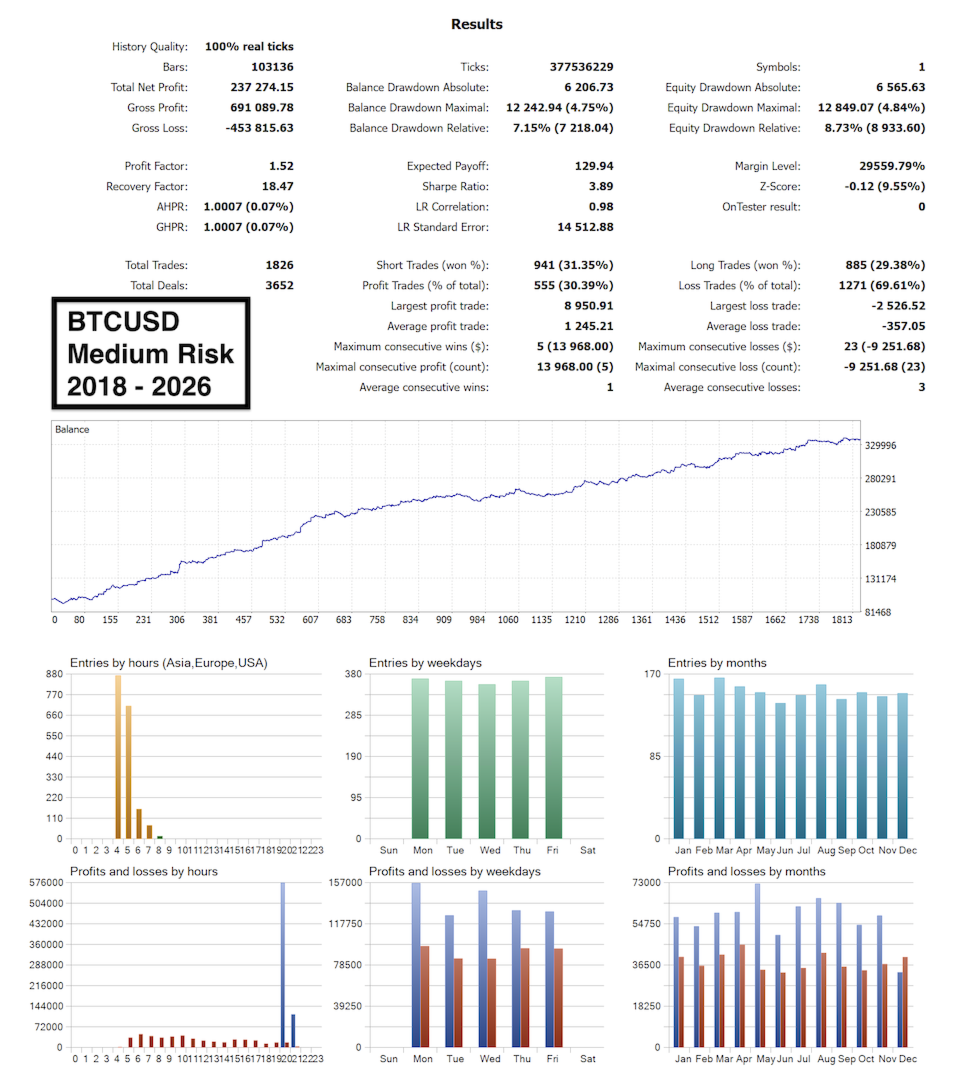
Range Breakout EA v5.20 MT5 is an automated Expert Advisor designed for MetaTrader 5, using a session-based range breakout strategy with built-in breakout filters and risk-management controls.
The EA monitors a relatively quiet Asian-session trading range and looks for potential breakouts as market activity increases around the London session. Its internal range-filtering logic is designed to help identify qualifying breakout conditions while filtering out lower-quality setups.
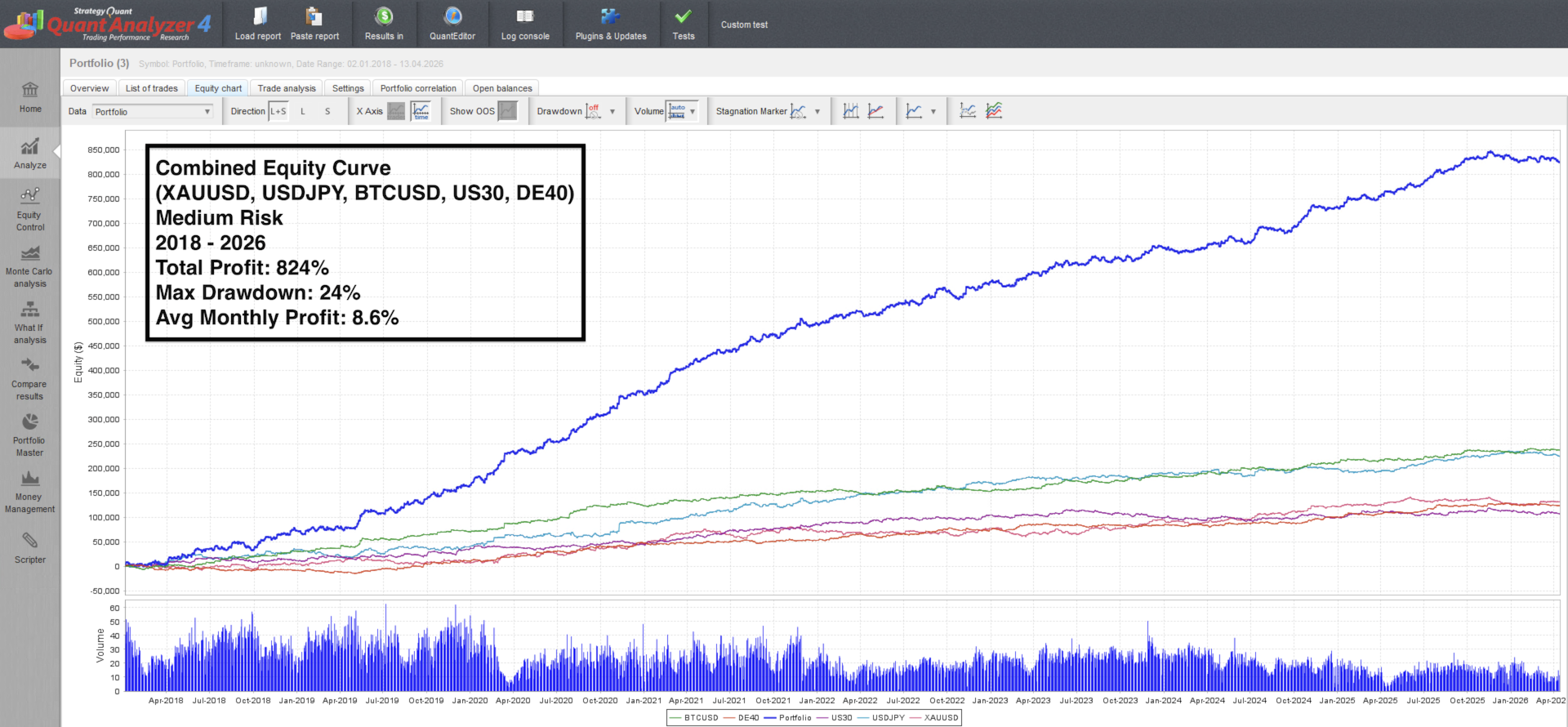
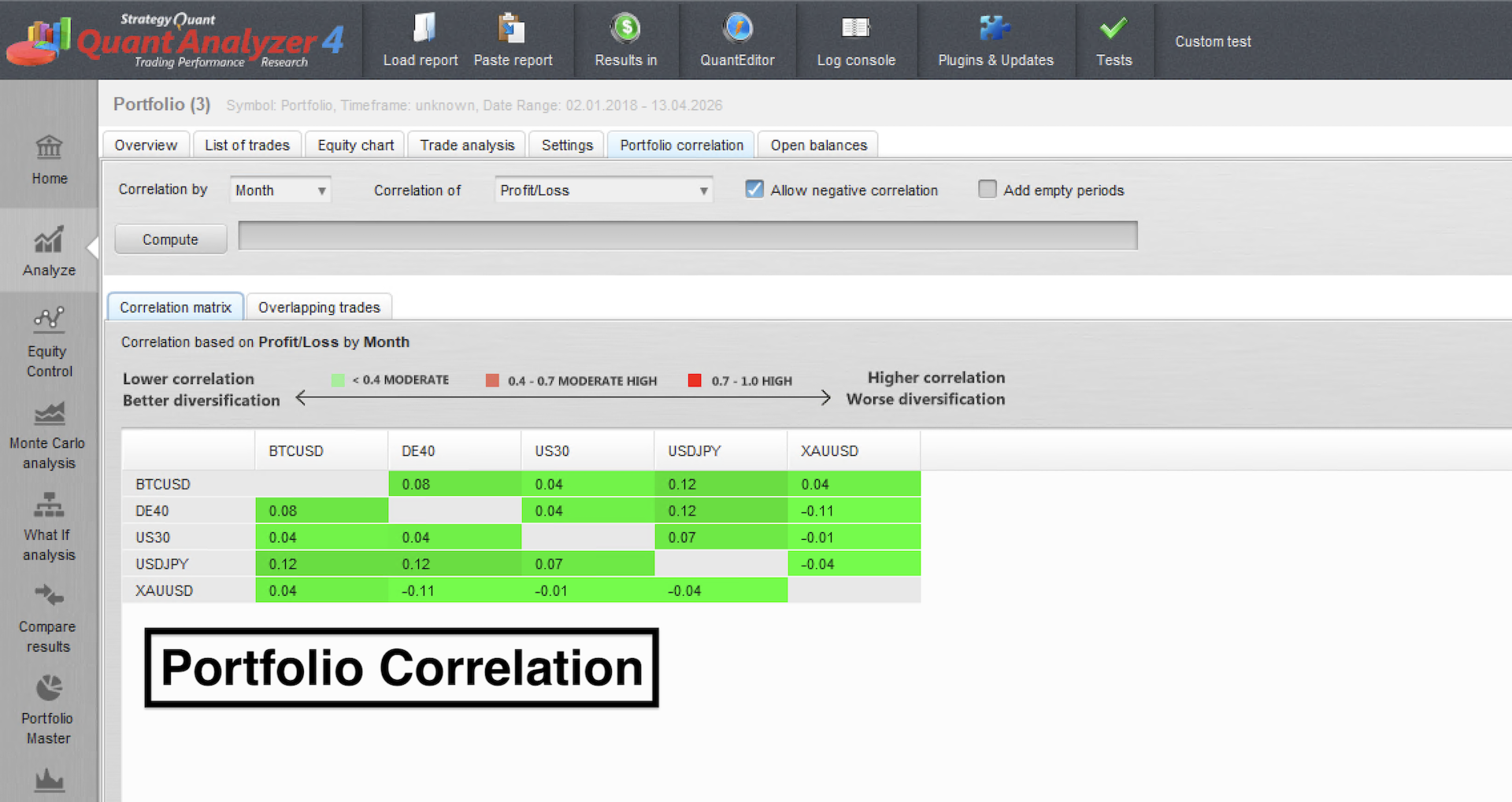
According to the developer’s documentation, the EA can operate across multiple markets including XAUUSD, USDJPY, BTCUSD, US30 and DE40. It also includes features such as daily drawdown protection, spread filtering, configurable risk modes and multi-market operation.
The package includes SET files/presets, making configuration easier for users who want predefined settings to test.
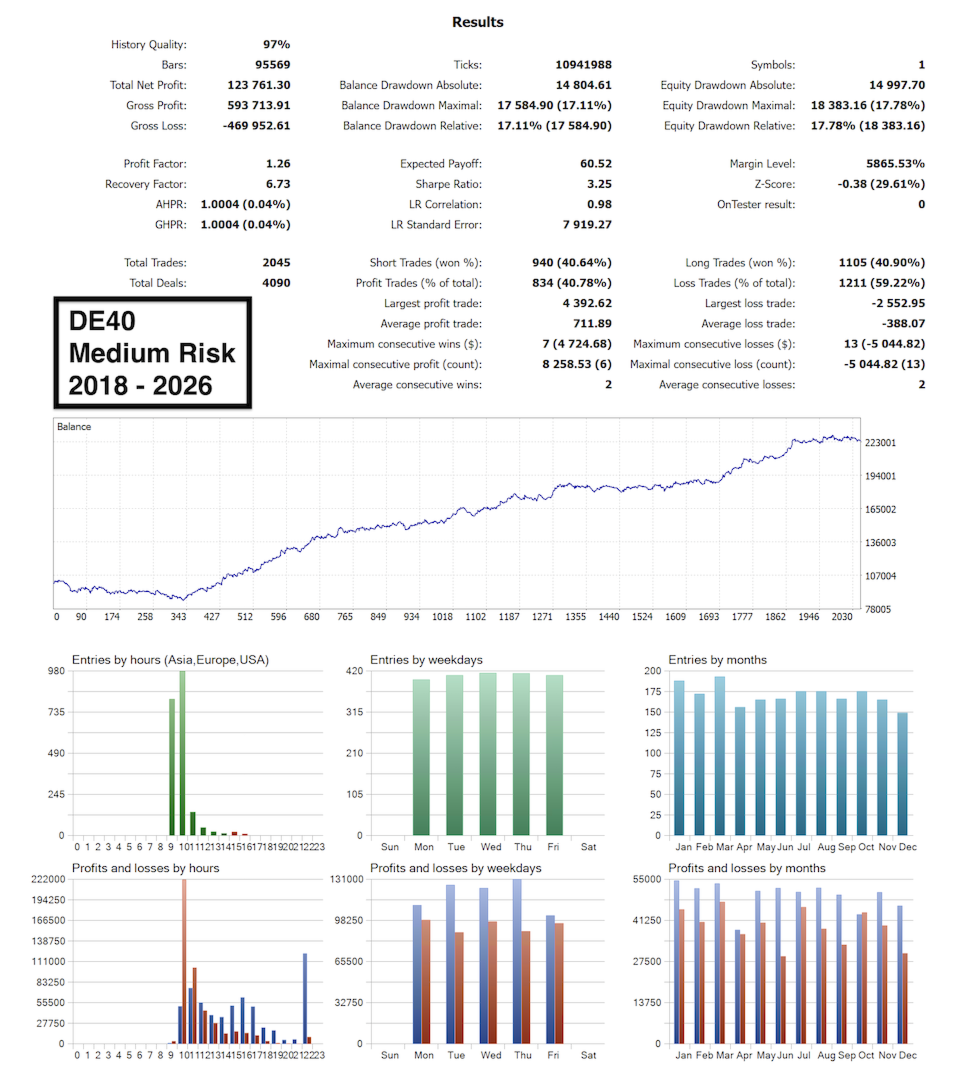
Important: Trading results vary according to market conditions, broker execution, spread, slippage and EA settings. Historical backtests or published results should not be considered guarantees of future performance.
🚀 Range Breakout EA v5.20 MT5 – Key Features
📊 Session-Based Range Breakout
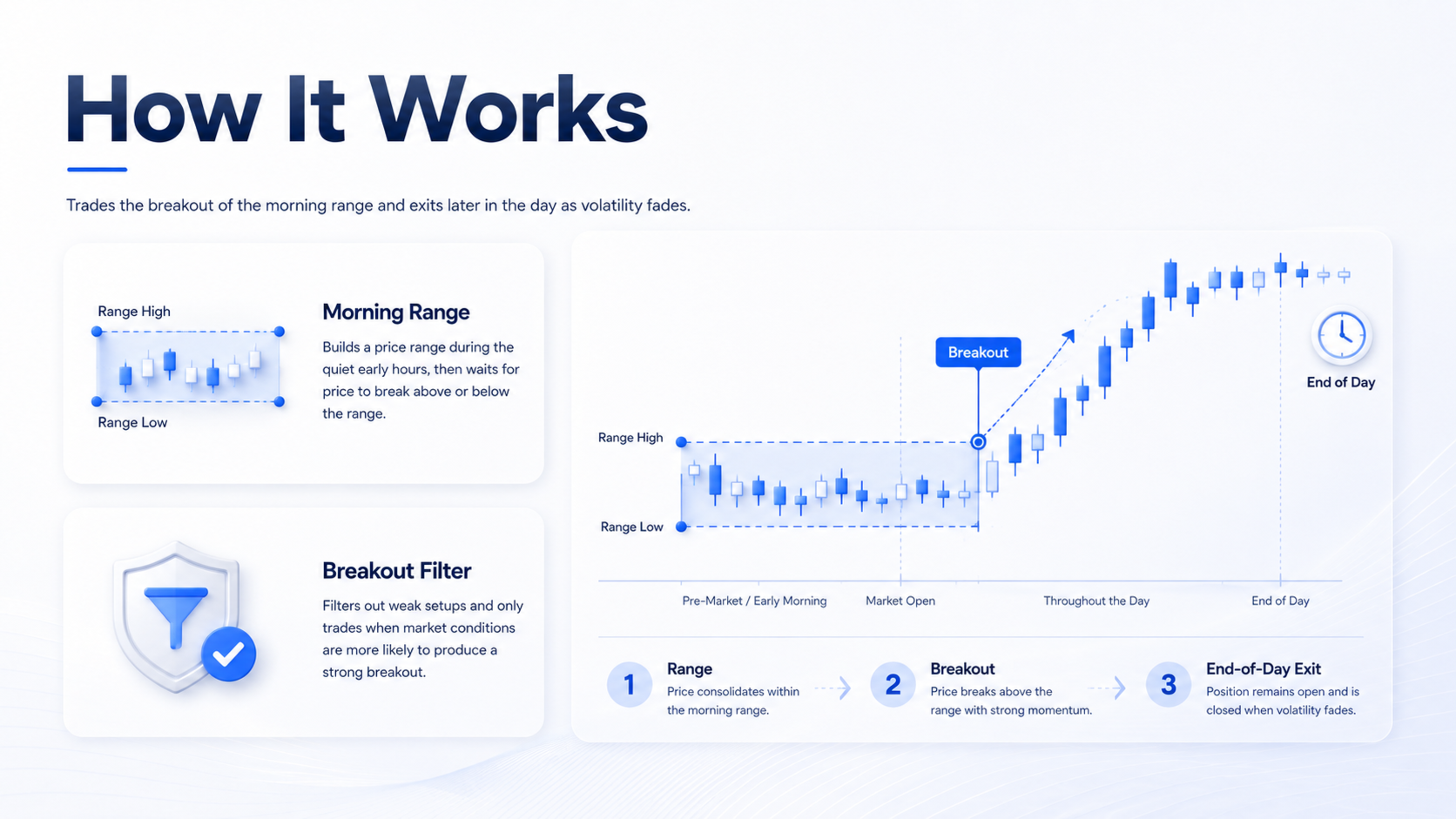
The EA is built around a session-range breakout concept. It monitors a relatively quiet market range and looks for expansion when market activity increases.
🌙 Asian Session Range
The system uses the Asian-session price range as part of its breakout framework, establishing a reference range before looking for subsequent price expansion.
🇬🇧 London Session Breakout
The EA looks for breakout opportunities as market activity increases around the London trading session.
🔎 Built-In Range Filters
The EA includes internal filtering logic intended to reject lower-quality breakout conditions rather than treating every range break as a trading opportunity.
🌍 Multi-Market Support
Public documentation lists the following markets:
- XAUUSD
- USDJPY
- BTCUSD
- US30
- DE40
🛡️ Daily Drawdown Protection
The EA provides daily drawdown controls designed to limit trading activity when configured loss thresholds are reached.
📉 Spread Filter
A spread filter can help prevent trading when market transaction costs exceed the configured conditions.
⚙️ Multiple Risk Modes
The EA provides:
- Low Risk
- Medium Risk
- High Risk
It also supports configurable risk settings according to the available parameters.
🚫 No Grid or Martingale
According to the developer’s documentation, the system does not use grid or martingale recovery methods.
🖥️ Flexible Chart Operation
The EA can be operated from one chart or configured across individual market charts.
📋 Range Breakout EA v5.20 Specifications
| Specification | Details |
|---|---|
| Product | Range Breakout EA with Range Filters v5.20 |
| Platform | MetaTrader 5 |
| Strategy Type | Session Range Breakout |
| Primary Logic | Range Expansion / Breakout |
| Markets | XAUUSD, USDJPY, BTCUSD, US30, DE40 |
| Timeframe | Developer states chart timeframe does not matter |
| Session Concept | Asian Range → London Breakout |
| Breakout Filter | Included |
| Risk Modes | Low / Medium / High |
| Risk Control | Manual Risk % / Fixed Lot options |
| Spread Filter | Yes |
| Daily Drawdown Control | Yes |
| Grid | No, according to developer |
| Martingale | No, according to developer |
| Operation | One Chart or Individual Charts |
| SET Files | Included |
⚙️ Range Breakout EA v5.20 Settings
The EA provides several configuration options for controlling risk, execution and trade management.
💰 Risk Management
Users can configure the available risk-management settings using options such as:
- Risk mode
- Manual risk percentage
- Fixed lot size
This allows traders to test different position-sizing approaches.
📉 Spread Filter
The spread filter can be configured to help prevent trades during conditions where spreads are above the permitted level.
🛡️ Daily Drawdown Control
Daily drawdown settings can be used to control the EA’s trading activity based on the configured daily loss threshold.
🔢 Magic Number
A configurable Magic Number helps the EA identify and manage its own trades.
📝 Trade Comment
Trade-comment settings can be used to identify positions opened by the Expert Advisor.
📊 Chart Information
The EA can display trading information such as:
- Daily profit
- Daily drawdown
- Trading status
- Relevant EA information
📈 ATR-Based Volatility Logic
Public configuration information also describes ATR-based volatility calculations and range-related parameters used within the system.
🔄 How Does Range Breakout EA v5.20 Work?
The strategy follows a session-based breakout structure.
1️⃣ Establish the Trading Range
During a relatively quieter market period, the EA identifies a price range that becomes the reference area for the breakout setup.
2️⃣ Monitor Market Activity
As the market moves toward a more active trading session, the EA continues monitoring the established range.
3️⃣ Detect a Breakout
If price moves beyond the relevant range boundary, the EA evaluates the breakout using its configured filtering conditions.
4️⃣ Apply Breakout Filters
The internal filtering logic is designed to help distinguish potentially qualifying breakouts from weaker conditions.
5️⃣ Execute the Trade
When the configured conditions are satisfied, the EA can automatically execute a trade.
6️⃣ Apply Risk Controls
Configured risk, spread and daily drawdown parameters can influence whether the EA is permitted to trade.
This creates an automated workflow centered around range formation → breakout → filtering → execution → risk management.
🌍 Supported Markets
Range Breakout EA v5.20 is designed for multi-market operation.
🥇 XAUUSD – Gold
Can be used to evaluate range breakout behavior on Gold, a market known for periods of significant intraday volatility.
💴 USDJPY
The EA can also be configured for USDJPY according to the listed market coverage.
₿ BTCUSD
The product documentation lists BTCUSD among its supported markets.
📈 US30
US30 is another listed market for the EA.
🇪🇺 DE40
DE40 is also included among the publicly listed markets.
Broker symbols may use different naming conventions, such as suffixes or prefixes. Always verify the exact symbol available on your MT5 broker.
⏱️ Does Range Breakout EA v5.20 Require a Specific Timeframe?
According to the developer, the conventional chart timeframe does not determine the core strategy, because the EA uses its own session and range logic.
This means the system should be evaluated according to its documented session configuration rather than assuming that it is a conventional M5, M15 or H1 strategy.
For live deployment, users should verify the recommended configuration and supplied SET files for their specific broker and market.
🖥️ One-Chart vs Individual-Market Operation
One useful feature of the EA is its flexible deployment structure.
One-Chart Operation
The EA can operate from a single chart while managing its configured markets, depending on the product’s supported configuration.
Individual Charts
Users can also configure the EA separately for individual markets.
This gives traders flexibility when testing different markets and risk configurations.
📁 SET Files Included
The Range Breakout EA v5.20 package includes SET files/presets.
Preset files can simplify the initial configuration process by providing predefined parameter combinations.
Instead of manually configuring every input, users can load the appropriate SET file and then adjust the settings according to their own testing requirements.
🎯 Why Consider Range Breakout EA v5.20?
The system combines several elements into one automated MT5 workflow:
- 📊 Session-based range detection
- 🚀 Breakout trading logic
- 🔎 Additional range filtering
- 🌍 Multi-market support
- 🛡️ Daily drawdown controls
- 📉 Spread filtering
- ⚙️ Multiple risk modes
- 📁 SET file support
- 🚫 No grid methodology according to the developer
- 🚫 No martingale methodology according to the developer
Its core concept is particularly relevant for traders interested in session breakout and range expansion strategies.
🧪 Recommended Testing
Before using Range Breakout EA v5.20 on a live account, consider the following testing process:
1. Install the EA
Add the Expert Advisor to your MT5 terminal.
2. Load the SET File
Start with the supplied configuration where appropriate.
3. Select Your Market
Test XAUUSD, USDJPY, BTCUSD, US30 or DE40 according to your intended setup.
4. Backtest
Use MT5 Strategy Tester to examine historical behavior.
5. Forward Test
Run the EA on a demo account under current broker conditions.
6. Evaluate Drawdown
Review maximum drawdown, losing periods and trading frequency rather than focusing only on profit.
7. Check Execution Conditions
Compare spread, slippage and execution behavior with the conditions used during testing.
8. Adjust Risk Carefully
Risk settings should be selected based on your own account size and risk tolerance.
❓ Frequently Asked Questions
What is Range Breakout EA v5.20?
Range Breakout EA v5.20 is an automated MetaTrader 5 Expert Advisor based on session-range breakout logic with additional range filtering and risk-management features.
What markets does the EA support?
The publicly listed markets include XAUUSD, USDJPY, BTCUSD, US30 and DE40.
Does the EA use a fixed timeframe?
According to the developer, the chart timeframe does not matter because the EA uses its own session and range logic.
What is the trading strategy?
The EA is based on a session range breakout concept, using a relatively quiet range as a reference before looking for breakouts during increased market activity.
Does Range Breakout EA use the London session?
The documented strategy focuses on breakouts as market activity increases around the London session following the formation of the earlier range.
Does the EA use martingale?
According to the developer’s product documentation, no martingale methodology is used.
Does the EA use grid trading?
According to the developer’s documentation, the EA does not use a grid approach.
Does it have a spread filter?
Yes. A spread filter is included among the documented features.
Does it have drawdown protection?
Yes. The EA includes daily drawdown controls.
Does Range Breakout EA v5.20 include SET files?
Yes. The product package includes SET files/presets.
Can I use it with Gold?
Yes. XAUUSD is one of the markets listed for the EA.
Does the EA guarantee profits?
No. Automated trading software cannot guarantee future profits. Results can vary depending on market conditions, broker execution, spreads, slippage, settings and risk management.
⚠️ Risk Disclaimer
Range Breakout EA v5.20 is automated trading software and does not guarantee profits.
Breakout strategies can experience false breakouts, rapid reversals and periods of reduced market activity. Markets such as Gold, Bitcoin and major indices can also experience significant volatility.
Backtest and historical results represent past market conditions and should not be treated as guarantees of future performance.
Always test the EA using your own broker, account conditions and risk settings before considering live trading. Only trade with capital you can afford to lose.
🛒 Get Range Breakout EA v5.20 MT5 + SET Files
Looking for an automated Range Breakout EA for MetaTrader 5?
Range Breakout EA v5.20 combines session-range breakout logic, internal filtering, multi-market support and configurable risk controls in one MT5 Expert Advisor.
With SET files included, you can start testing predefined configurations and evaluate the system under your own broker conditions.
Download Range Breakout EA v5.20 MT5 + SET Files and start your testing process.



Reviews
There are no reviews yet.