

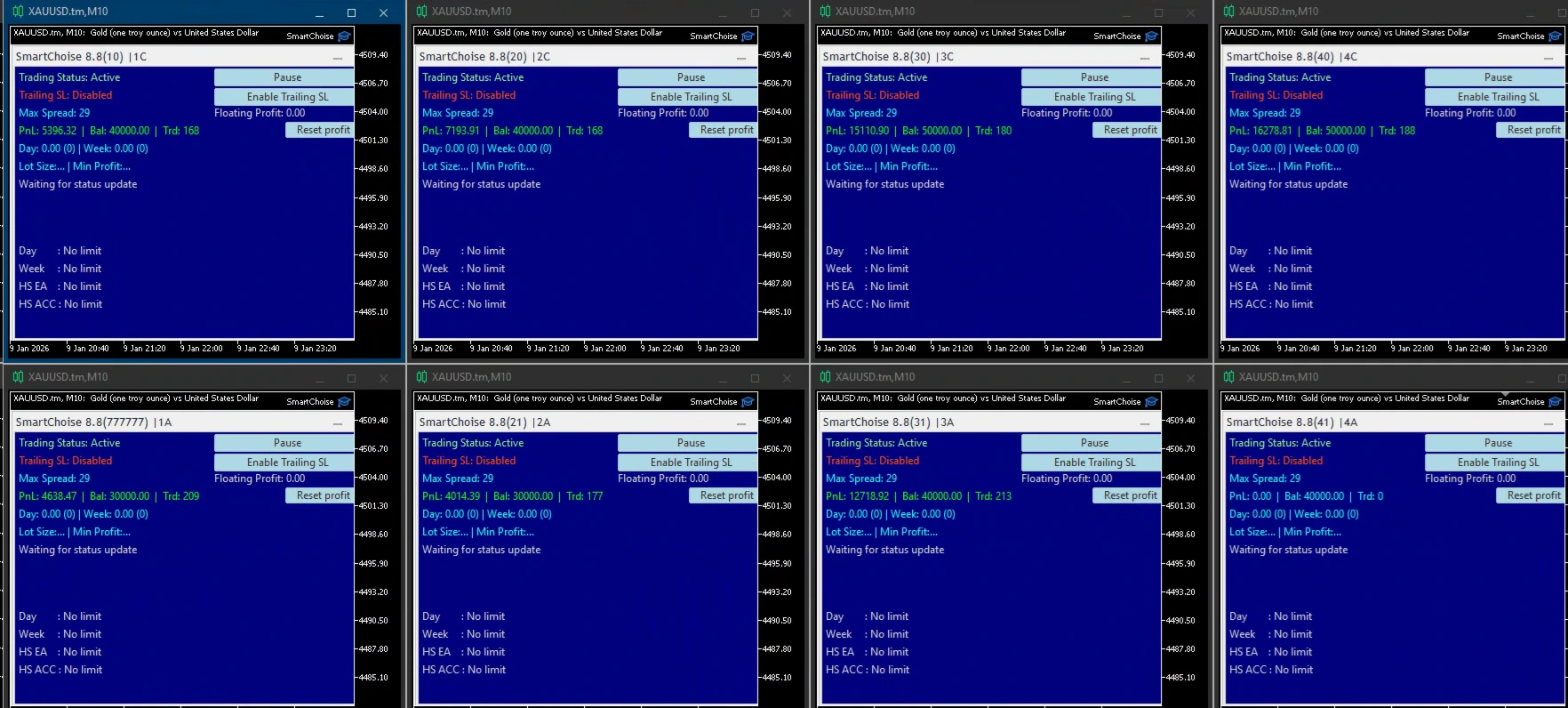
SmartChoise V9.5 EA MT5 | Automated Forex Trading Robot
SmartChoise V9.5 EA MT5 is an automated Forex Expert Advisor designed for MetaTrader 5 (MT5). The EA is built to monitor market conditions, identify trading opportunities according to its programmed rules, and automatically execute and manage trades.
Instead of requiring traders to continuously monitor charts and manually place every order, SmartChoise V9.5 can automate the trading process according to its configured parameters.
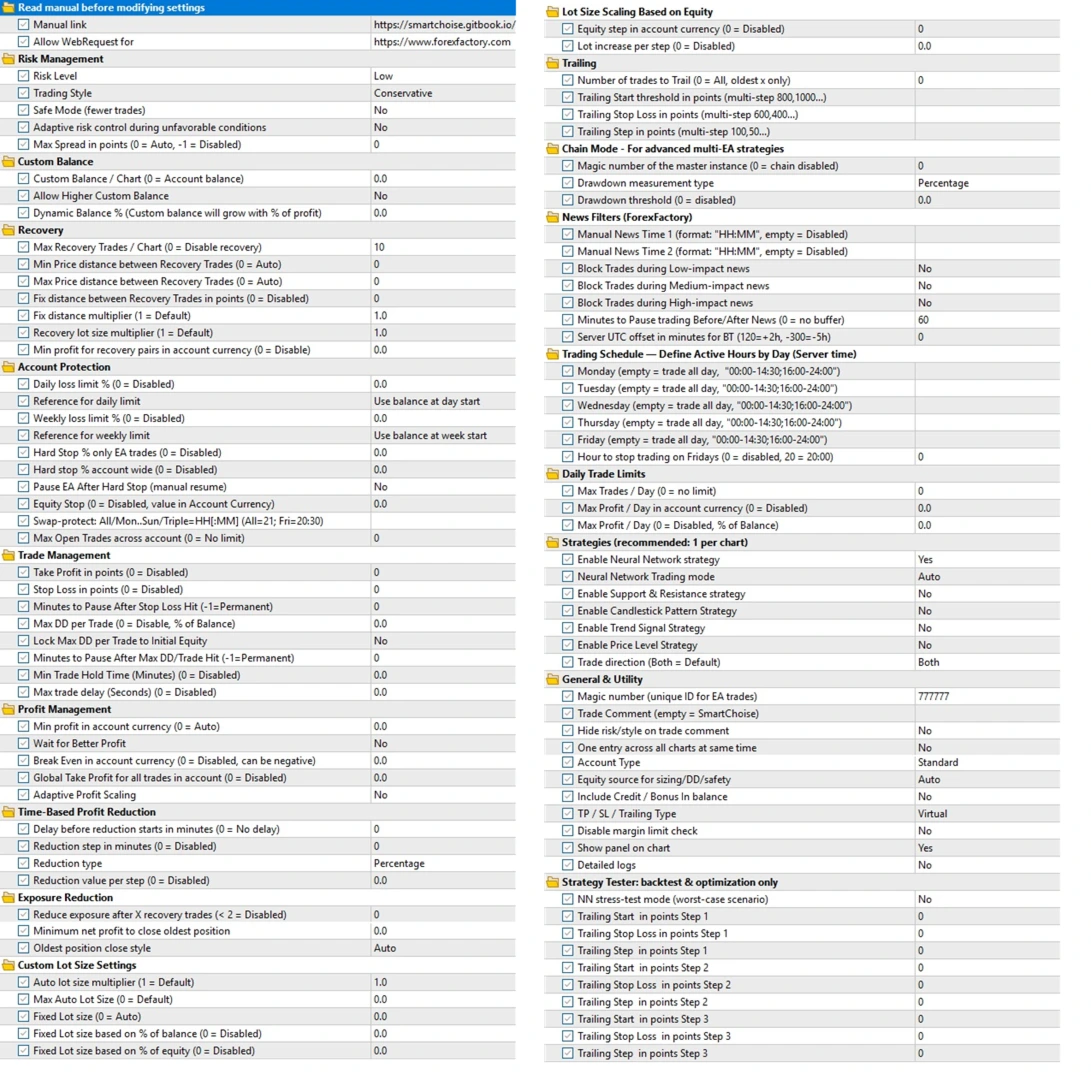
The EA provides configurable trading and risk-management settings, allowing users to adjust supported parameters such as lot size, risk, Stop Loss, Take Profit, maximum trades, and trading hours where available.
Because the exact trading pair and timeframe can depend on the supplied configuration, users should check the included SetFiles or EA Inputs for the recommended setup for their specific V9.5 package.
🤖 What Is SmartChoise V9.5 EA MT5?
SmartChoise V9.5 is an automated trading robot developed for the MetaTrader 5 platform.
The EA monitors the market according to its programmed trading rules and can automatically execute positions when the required conditions are met.
Once installed and configured, SmartChoise V9.5 can handle repetitive trading tasks such as market monitoring, order execution, and position management.
The exact internal entry and exit methodology is not specified in the supplied product information. Therefore, traders should refer to the actual EA settings and documentation included with their V9.5 package.
💱 SmartChoise V9.5 Specifications
| Specification | Details |
|---|---|
| Product Name | SmartChoise V9.5 EA |
| Version | V9.5 |
| Platform | MetaTrader 5 |
| Market | Forex |
| Trading Mode | Automated |
| Timeframe | Configuration dependent |
| Trading Pair | Configuration dependent |
| Lot Settings | Configurable where supported |
| Risk Settings | Configurable where supported |
| Stop Loss | Supported where available |
| Take Profit | Supported where available |
| Maximum Trades | Supported where available |
| Magic Number | Supported where available |
| Trading Hours | Supported where available |
| SetFiles | Check supplied package |
✨ Key Features
🤖 Automated Forex Trading
SmartChoise V9.5 can automate the process of monitoring the market and executing trades according to its programmed conditions.
This reduces the need for continuous manual chart monitoring.
🖥️ MetaTrader 5 Compatibility
The EA is designed specifically for MetaTrader 5, allowing it to operate within the MT5 trading environment.
📊 Automated Market Monitoring
Once active, the EA can continuously monitor the configured market while the MT5 terminal is running.
⚙️ Configurable Parameters
SmartChoise V9.5 provides an Inputs section where supported parameters can be adjusted according to the EA’s configuration.
💰 Lot & Risk Management
Depending on the specific build, the EA can provide settings for:
- Lot size
- Risk exposure
- Position limits
- Trade management
Users should verify the exact available options in their MT5 Inputs.
🛑 Stop Loss
Where supported by the configuration, Stop Loss can be used to define a protective exit level for individual trades.
🎯 Take Profit
Take Profit settings can be used where supported to establish predefined profit targets.
🔢 Maximum Trade Control
Where available, maximum-trade parameters can help control the number of positions the EA is permitted to maintain.
🆔 Magic Number
The Magic Number can be used to identify positions created by the EA, where this parameter is available.
⏰ Trading Hours
Some configurations may provide trading-hour controls that determine when the EA is permitted to operate.
🔄 Automated Trade Management
After entering a position, the EA can manage trades according to its programmed rules and selected parameters.
⚙️ SmartChoise V9.5 Settings
The exact settings can vary depending on the V9.5 build and configuration supplied with the product.
Common configurable areas may include:
💰 Lot Size
Controls the trading volume used when opening positions, where supported.
📊 Risk Management
Allows supported risk-related parameters to be adjusted according to the user’s account and trading plan.
🛑 Stop Loss
Defines a protective exit level when the feature is available.
🎯 Take Profit
Sets a predefined profit target where supported.
🔢 Maximum Trades
Can limit the number of active positions if the parameter is included in the EA.
🆔 Magic Number
Allows EA-generated trades to be identified separately from manually placed or other automated trades.
⏰ Trading Schedule
Where available, trading-hour parameters can restrict the EA’s operating period.
Important: Always check the actual MT5 Inputs and supplied SetFiles before changing any parameter.
🔄 How SmartChoise V9.5 Works
1️⃣ Install the EA
Install SmartChoise V9.5 into your MetaTrader 5 terminal.
2️⃣ Select the Trading Chart
Attach the EA to the symbol and timeframe specified by the supplied configuration or SetFile.
3️⃣ Load the Configuration
Load the appropriate SetFile if one is included, or configure the available parameters manually.
4️⃣ Monitor Market Conditions
The EA continuously evaluates the configured market according to its programmed trading rules.
5️⃣ Identify a Trading Opportunity
When the required conditions are satisfied, the EA can identify a potential entry.
6️⃣ Execute the Trade
The Expert Advisor can automatically place the trade without requiring manual order entry.
7️⃣ Manage the Position
Open trades can be managed according to the EA’s programmed rules and available SL, TP, and trade-management settings.
8️⃣ Continue Monitoring
While MetaTrader 5 remains operational, the EA can continue monitoring the configured market for new opportunities.
🎯 Why Use SmartChoise V9.5 EA MT5?
SmartChoise V9.5 is designed for traders who want to explore automated Forex trading on MetaTrader 5.
Instead of manually watching charts and entering every trade, an Expert Advisor can automate repetitive tasks according to predefined rules.
Key characteristics include:
- Automated Forex trading
- MetaTrader 5 compatibility
- Automated market monitoring
- Configurable parameters
- Lot and risk controls where supported
- Automated trade execution
- Position management
- Optional SL/TP controls
- Maximum-trade controls where available
- Trading-hour controls where available
The exact trading strategy, currency pairs, and timeframe should be confirmed from the supplied configuration rather than assumed.
🎯 Key Benefits
- 🤖 Automated Trading – automates supported trading tasks.
- 🖥️ MT5 Compatible – designed specifically for MetaTrader 5.
- 📊 Market Monitoring – can continuously monitor configured markets while MT5 is running.
- ⚙️ Configurable Settings – supported parameters can be adjusted through the EA Inputs.
- 💰 Risk Controls – available lot and risk parameters can help configure account exposure.
- 🛑 Trade Protection – SL/TP controls are available where supported.
- 🔄 Automated Management – positions can be managed according to programmed rules.
- ⏰ Trading Schedule – trading-hour controls may be available depending on the configuration.
- 🧠 Systematic Execution – follows programmed conditions rather than requiring manual order placement.
- ⏱️ Time Saving – reduces the need for constant manual chart monitoring.
📦 What Is Included?
The exact contents depend on the V9.5 package supplied.
The product is centered around:
- SmartChoise V9.5 EA
- MetaTrader 5 Version
- Configurable EA Inputs
- Recommended configuration / SetFiles where supplied
Always verify the downloaded package for the exact files and supported configurations.
🧪 Recommended Testing Process
Before considering live trading, follow a structured testing process.
Step 1 — Install MetaTrader 5
Make sure your MT5 terminal is correctly installed and connected to your broker.
Step 2 — Install SmartChoise V9.5
Add the EA to the appropriate MT5 directory and restart or refresh the terminal if required.
Step 3 — Check the Recommended Configuration
Verify the recommended trading pair, timeframe, and settings from the supplied documentation or SetFiles.
Step 4 — Load the SetFile
If a SetFile is included, load the relevant configuration rather than manually guessing the parameters.
Step 5 — Backtest
Use the MT5 Strategy Tester to examine historical behavior.
Step 6 — Forward Test
Run the EA on a demo account to evaluate its behavior under current market conditions.
Step 7 — Monitor Risk
Evaluate:
- Maximum drawdown
- Number of open positions
- Lot sizes
- Spread
- Slippage
- Execution quality
- Trading frequency
- Broker conditions
Step 8 — Review Before Live Use
Only consider live deployment after understanding the EA’s behavior and determining whether its risk profile is appropriate for your trading plan.
❓ Frequently Asked Questions
What is SmartChoise V9.5 EA?
SmartChoise V9.5 is an automated Forex Expert Advisor for MetaTrader 5 designed to monitor markets and execute trades according to its programmed rules.
Is SmartChoise V9.5 compatible with MT4?
The supplied product information specifies MT5. An MT4 version is not specified.
What markets does SmartChoise V9.5 trade?
It is described as a Forex EA, but the exact currency pairs are configuration dependent and should be confirmed from the supplied SetFiles or documentation.
What timeframe does SmartChoise V9.5 use?
The timeframe is configuration dependent. Check the recommended SetFile or EA documentation for the intended setup.
Is SmartChoise V9.5 fully automated?
Yes. It is designed as an automated Expert Advisor capable of monitoring markets and executing trades according to its programmed conditions.
Can I change the lot size?
Lot-size configuration may be available through the EA Inputs. The exact options should be verified in the installed V9.5 build.
Does SmartChoise V9.5 have Stop Loss and Take Profit?
SL/TP controls may be available depending on the specific configuration. Always check the actual MT5 Inputs before use.
Can I use a SetFile?
If a SetFile is supplied with your V9.5 package, it can be loaded through the EA’s configuration process.
Does SmartChoise V9.5 guarantee profits?
No. No Expert Advisor can guarantee trading profits. Actual results can vary because of market conditions, spread, slippage, execution, broker conditions, and account risk.
Should I test SmartChoise V9.5 before using it live?
Yes. Backtesting and demo forward testing are recommended before considering live deployment.
⚠️ Risk Disclaimer
Forex trading involves substantial financial risk, and automated trading does not eliminate the possibility of losses.
Actual EA performance can vary depending on market conditions, spread, slippage, broker execution, liquidity, trading parameters, account size, and risk settings.
Backtest results and historical performance do not guarantee future results.
SmartChoise V9.5 should be properly tested on a demo account before live use. Traders should understand the EA’s configuration and use appropriate risk management.
Never risk funds you cannot afford to lose.
🛒 SmartChoise V9.5 EA MT5
SmartChoise V9.5 EA MT5 is an automated Forex trading robot designed for MetaTrader 5, providing automated market monitoring, trade execution, and configurable trading and risk-management parameters.
For traders looking for an MT5 Forex Expert Advisor, SmartChoise V9.5 provides a systematic framework for automated trading while allowing users to configure the supported parameters according to their selected setup.



Reviews
There are no reviews yet.