


📐 What Is Gann Made Easy V2.8?
Gann Made Easy V2.8 is a technical trading indicator that brings Gann-style market analysis into the MetaTrader environment.
Based on concepts associated with W.D. Gann, the indicator is designed to help traders examine:
- Market direction
- Potential trend changes
- Important price levels
- Potential support and resistance areas
- Possible trading zones
- Areas that may require additional confirmation
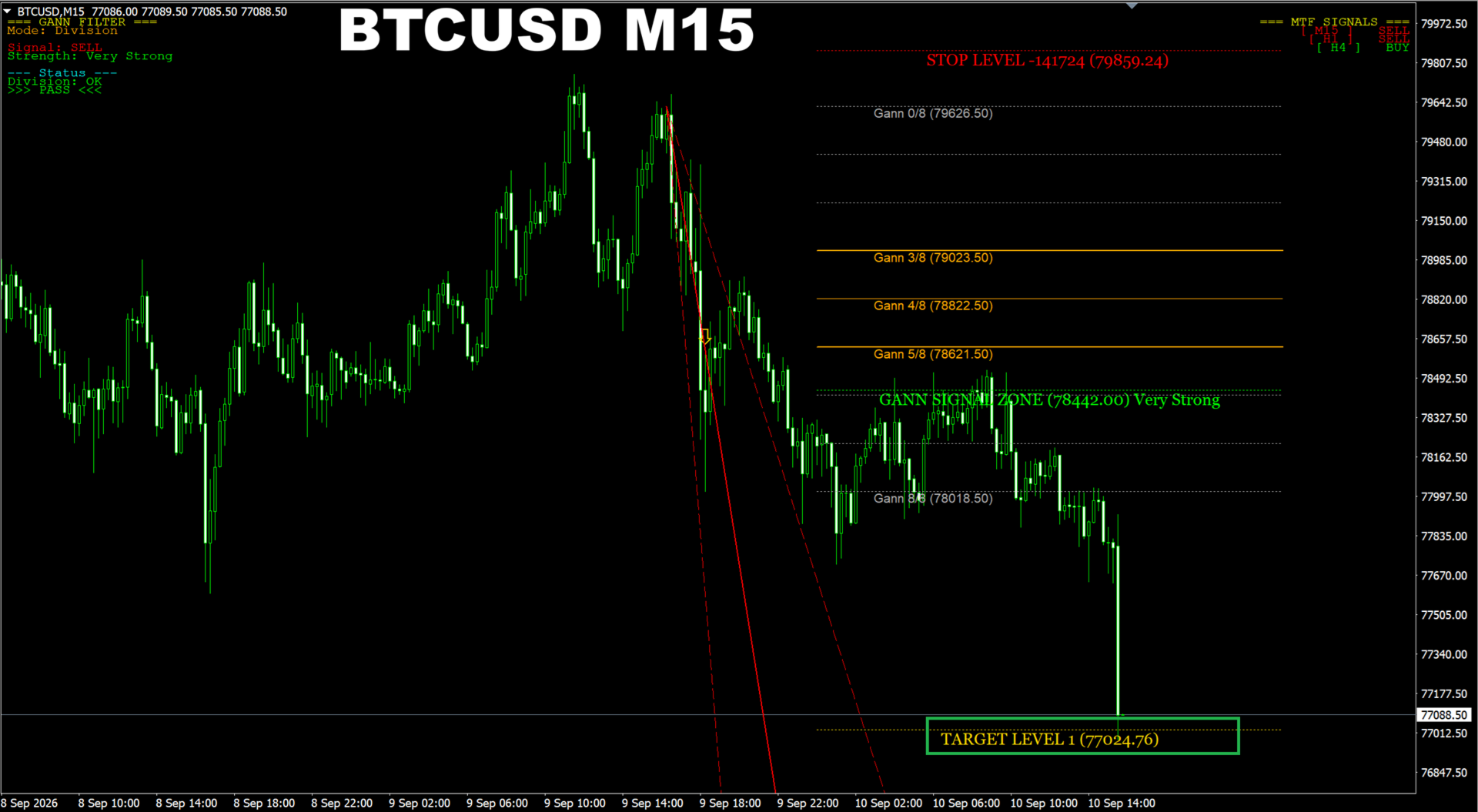
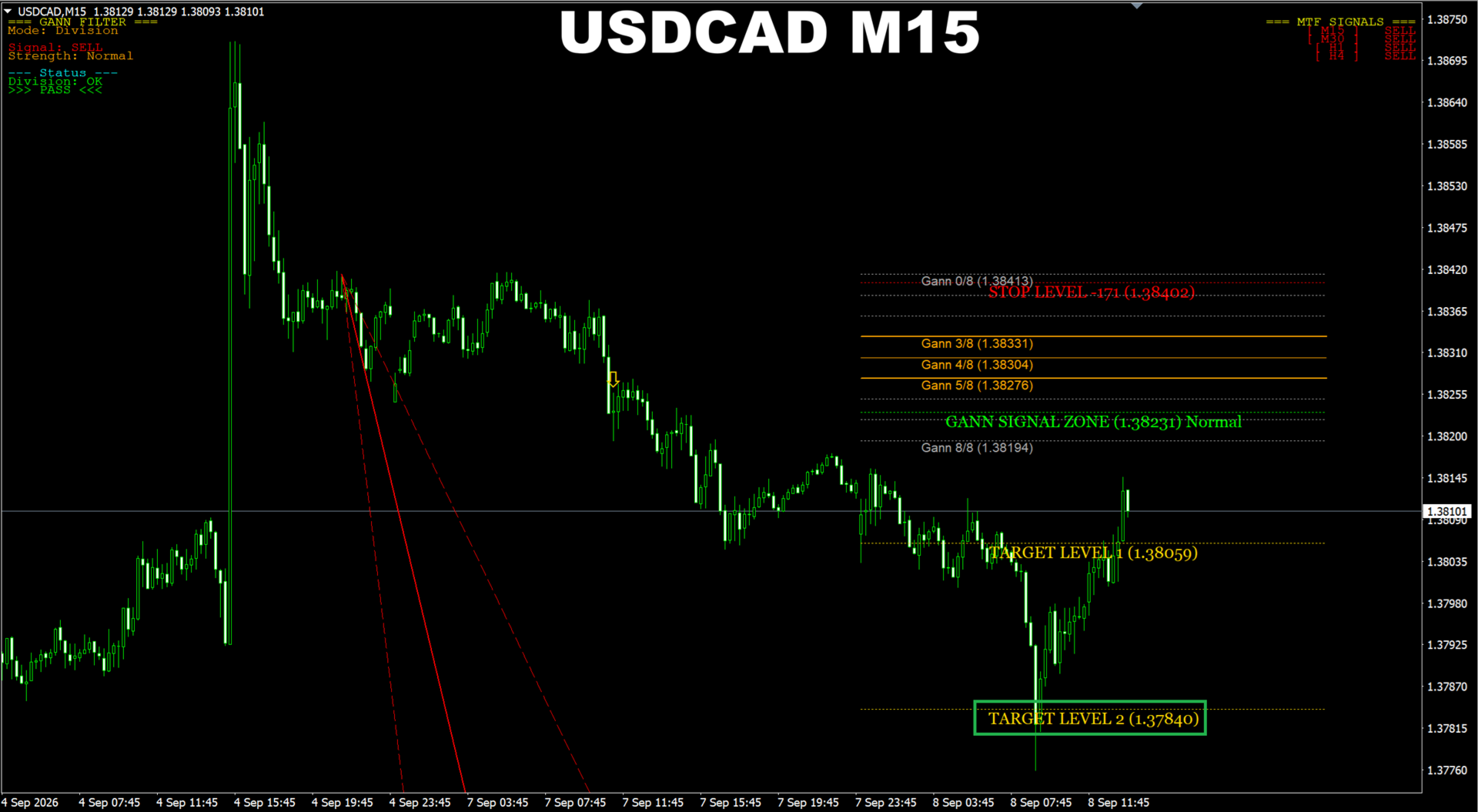
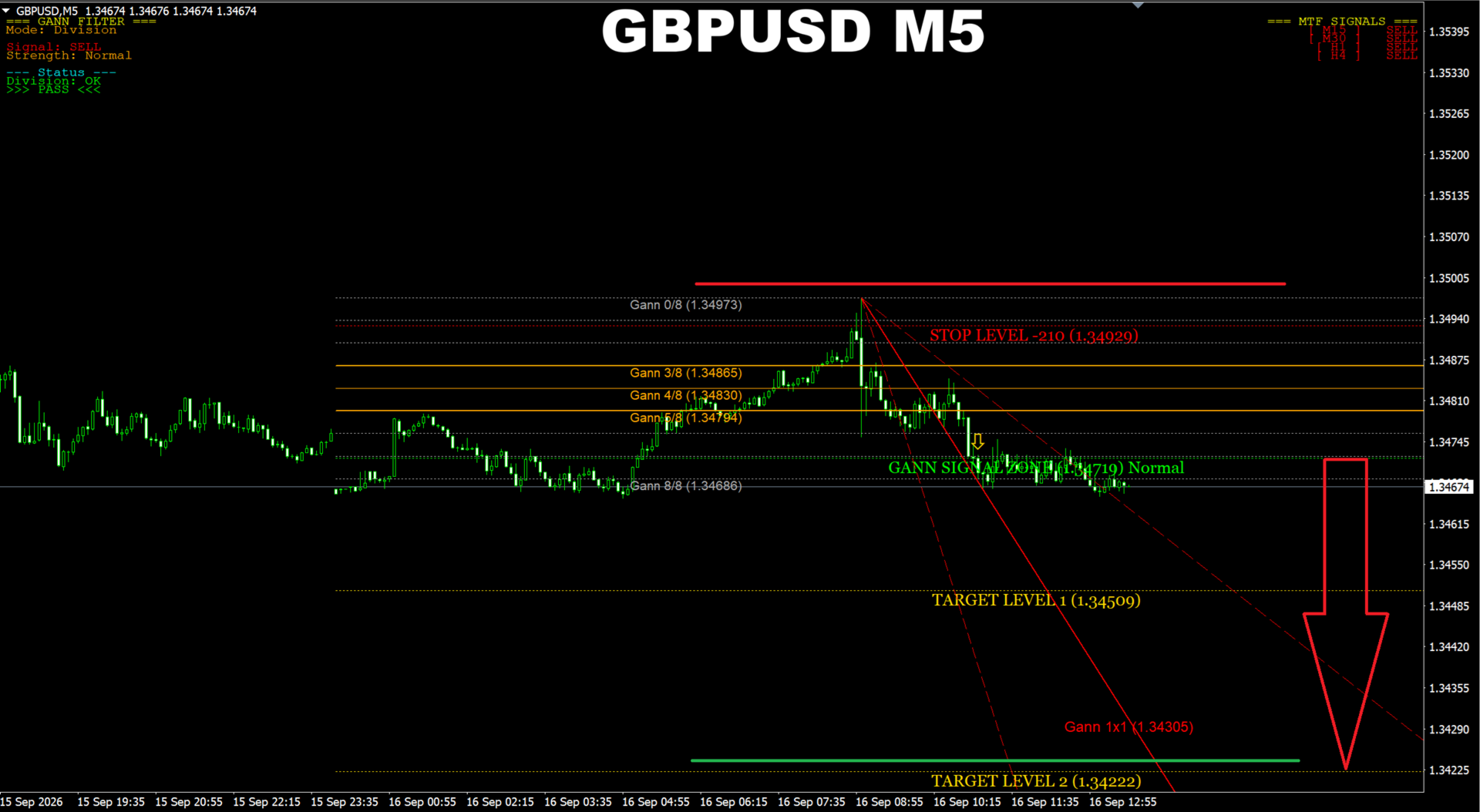
The indicator presents its analysis directly on the MT4 or MT5 chart, giving traders additional information to incorporate into their own trading decisions.
It is intended as a technical-analysis and decision-support tool, rather than an automated trading robot.
💱 Gann Made Easy V2.8 Specifications
| Specification | Details |
|---|---|
| Product Name | Gann Made Easy V2.8 |
| Version | V2.8 |
| Product Type | Technical Indicator |
| Platforms | MetaTrader 4 & MetaTrader 5 |
| Markets | Forex, Gold, indices & supported MT4/MT5 instruments |
| Timeframe | Flexible |
| Analysis Style | Gann-Based Technical Analysis |
| Market Direction Analysis | Yes |
| Potential Price Levels | Yes |
| Trading Zones | Yes |
| Chart Display | Yes |
| Customizable Settings | Yes |
| Automated Trading | No |
| External DLL | No DLL |
| Expert Advisor | No |
✨ Key Features
📐 Gann-Based Technical Analysis
Gann Made Easy V2.8 applies concepts associated with W.D. Gann’s technical-analysis methodology to help traders study price behavior and market structure.
The indicator provides another analytical perspective that can be combined with conventional technical-analysis methods.
📈 Market Direction Analysis
The indicator can help traders evaluate potential market direction and trend changes based on its Gann-related calculations.
It should be used as an analytical aid rather than as an independent guarantee of market direction.
🎯 Potential Trading Areas
Gann Made Easy can highlight areas that may deserve further attention when analyzing a chart.
These areas can be combined with price action and additional confirmation before a trading decision is made.
📊 Support & Resistance Analysis
The indicator can help traders study potentially important support and resistance areas within the market structure.
These levels can then be compared with other technical factors.
🔍 Multi-Market Compatibility
Gann Made Easy V2.8 can be used across different supported markets, including:
- Forex
- Gold
- Indices
- Other instruments supported by MT4/MT5
⏱️ Flexible Timeframe Usage
The indicator can be applied across different chart timeframes.
This allows traders to use it for broader market analysis or more detailed lower-timeframe studies depending on their trading methodology.
💻 MT4 & MT5 Compatibility
One of the major advantages of Gann Made Easy V2.8 is compatibility with both:
- MetaTrader 4
- MetaTrader 5
This makes the indicator suitable for traders who work across both MetaTrader platforms.
⚙️ Adjustable Settings
The indicator provides configurable parameters that allow traders to adjust available calculation and display options.
Depending on the specific version, settings may include:
- Calculation parameters
- Visual display options
- Signal display
- Chart elements
- Other indicator preferences
🔌 No DLL
The No DLL version is designed to operate without requiring external DLL files.
This can simplify installation and reduce dependency on external software components.
⚙️ Gann Made Easy V2.8 Settings
Gann Made Easy V2.8 provides configurable options through the MetaTrader indicator settings.
Depending on the specific build, traders may be able to customize:
📊 Calculation Parameters
Adjust available calculation-related settings according to the indicator’s supported inputs.
🎨 Visual Display
Control how technical information is displayed on the chart where supported.
🎯 Signal Display
Configure available signal or chart-marker settings.
📈 Chart Information
Adjust supported chart elements to make the indicator’s analysis easier to interpret.
Important: Exact input names and available parameters can vary by version. Always review the actual MT4/MT5 Inputs after installation.
🔄 How Gann Made Easy V2.8 Works
1️⃣ Select a Market
Open a supported instrument such as:
- XAUUSD
- Forex pairs
- Indices
- Other MT4/MT5-supported markets
2️⃣ Select a Timeframe
Apply the indicator to your preferred chart timeframe.
3️⃣ Load the Indicator
Add Gann Made Easy V2.8 to the selected MetaTrader chart.
4️⃣ Analyze Price Data
The indicator processes price information using its Gann-related calculations.
5️⃣ Review Market Direction
Use the displayed information to evaluate potential market direction and structural changes.
6️⃣ Identify Important Areas
Review potential support, resistance, price levels, and trading zones highlighted by the indicator.
7️⃣ Add Confirmation
Combine the indicator’s information with other methods such as:
- Price action
- Trend analysis
- Support and resistance
- Candlestick analysis
- Other technical indicators
8️⃣ Make the Trading Decision
The final trading decision remains with the trader.
Gann Made Easy V2.8 does not automatically execute trades.
🎯 Why Consider Gann Made Easy V2.8?
Gann Made Easy V2.8 provides traders with a way to incorporate Gann-style analysis into their existing MetaTrader workflow.
Rather than functioning as an automated Expert Advisor, it acts as a technical-analysis tool that provides chart-based information for traders to interpret.
Its MT4 and MT5 compatibility also makes it flexible for users who work with different MetaTrader platforms.
Key characteristics include:
- Gann-based technical analysis
- Market-direction analysis
- Potential support and resistance areas
- Potential trading zones
- Multi-market compatibility
- Flexible timeframe usage
- Adjustable display settings
- MT4 support
- MT5 support
- No DLL architecture
🎯 Key Benefits
- 📐 Gann-Based Analysis – brings Gann-related concepts to MetaTrader.
- 📈 Market Direction – helps analyze potential market direction and changes.
- 🎯 Trading Areas – highlights areas that may deserve additional analysis.
- 📊 Price-Level Analysis – supports the study of potential support and resistance.
- 🔍 Multi-Market Use – suitable for Forex, Gold, indices, and other supported instruments.
- ⏱️ Flexible Timeframes – can be applied across different chart timeframes.
- 💻 MT4 + MT5 – compatible with both major MetaTrader platforms.
- ⚙️ Adjustable Settings – allows supported calculation and display parameters to be configured.
- 🔌 No DLL – operates without external DLL dependencies.
- 🧠 Decision Support – provides additional technical information while leaving trade execution to the trader.
📦 What Is Included?
The supplied product information confirms:
- Gann Made Easy V2.8 Indicator
- MetaTrader 4 Version
- MetaTrader 5 Version
- No DLL version
Check the actual download package for the exact file structure and any additional documentation or presets.
🧪 Recommended Usage & Testing
Because Gann Made Easy V2.8 is an analytical indicator rather than an automated EA, testing should focus on understanding how its signals and chart information behave.
Step 1 — Install the Correct Version
Install the MT4 or MT5 version according to your trading platform.
Step 2 — Select Your Market
Apply the indicator to the instrument you want to analyze.
Step 3 — Choose a Timeframe
Start with the timeframe that matches your existing trading methodology.
Step 4 — Review the Indicator
Study the displayed Gann-related information and identify how it interacts with market structure.
Step 5 — Compare With Price Action
Do not rely exclusively on the indicator. Compare its information with price action and broader market conditions.
Step 6 — Test Different Markets
Evaluate the indicator across different supported instruments, such as Forex, Gold, and indices.
Step 7 — Test Different Timeframes
Observe how the indicator behaves on different timeframes before incorporating it into a live trading process.
Step 8 — Develop Confirmation Rules
Consider combining the indicator with your own:
- Entry rules
- Stop Loss rules
- Take Profit rules
- Risk-management framework
- Trend confirmation
- Price-action analysis
❓ Frequently Asked Questions
What is Gann Made Easy V2.8?
Gann Made Easy V2.8 is a technical-analysis indicator based on concepts associated with W.D. Gann and designed for MetaTrader 4 and MetaTrader 5.
Is Gann Made Easy an Expert Advisor?
No. It is an indicator, not an automated Expert Advisor.
Does Gann Made Easy automatically place trades?
No. The indicator is designed as a decision-support tool and does not automatically execute trades.
Does Gann Made Easy work on MT4?
Yes. A MetaTrader 4 version is available.
Does Gann Made Easy work on MT5?
Yes. A MetaTrader 5 version is available.
What markets can I use it on?
The supplied specifications indicate support for Forex, Gold, indices, and other instruments supported by MT4/MT5.
What timeframe does Gann Made Easy use?
The indicator has flexible timeframe usage and can be applied across different chart timeframes.
Does it require a DLL?
The supplied version is described as No DLL, meaning it is designed to operate without external DLL dependencies.
Can I combine Gann Made Easy with other indicators?
Yes. It can be used alongside price action, trend analysis, support/resistance, and other technical indicators.
Does Gann Made Easy guarantee profitable signals?
No. Technical indicators cannot guarantee profitable trades. Signals should be evaluated together with market conditions and appropriate risk management.
⚠️ Risk Disclaimer
Technical indicators are analytical tools and do not guarantee accurate market predictions or profitable trading results.
Gann-based analysis should be treated as one component of a broader trading methodology. Market conditions can change, and signals may produce false or conflicting indications.
Always combine indicator analysis with appropriate risk management, trade planning, and independent confirmation.
Past performance or historical signal behavior is not a guarantee of future results.
🛒 Gann Made Easy V2.8 Indicator MT4 & MT5 No DLL
Gann Made Easy V2.8 Indicator brings Gann-style technical analysis to MetaTrader 4 and MetaTrader 5, helping traders study market direction, potential support and resistance areas, price levels, and potential trading zones.
With flexible timeframe usage, multi-market compatibility, configurable settings, and No DLL operation, it can be added to an existing technical-analysis workflow without replacing the trader’s own decision-making process.
Use it as a confirmation and market-analysis tool alongside your established trading strategy and risk-management rules.
Reviews
There are no reviews yet.