

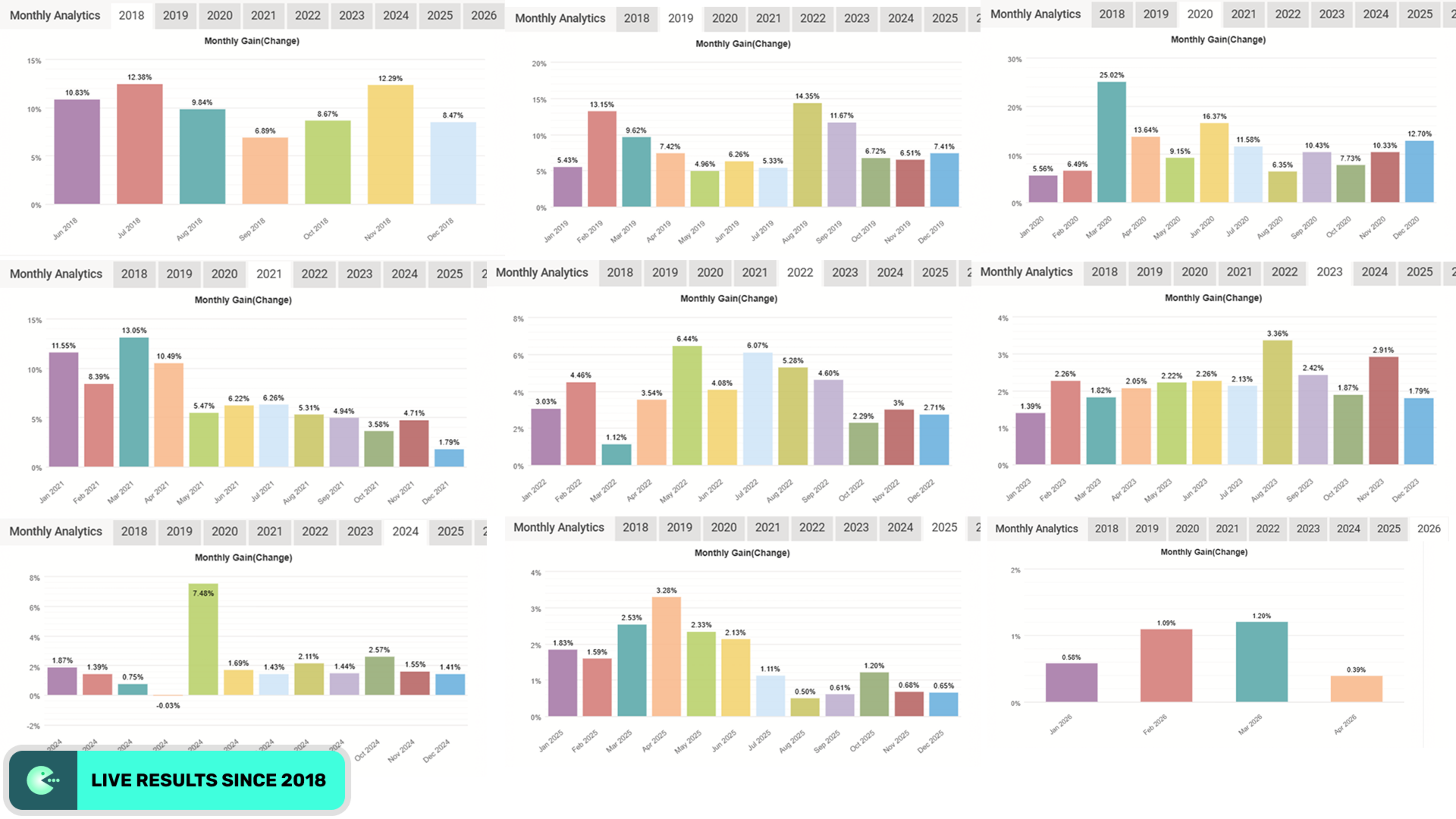

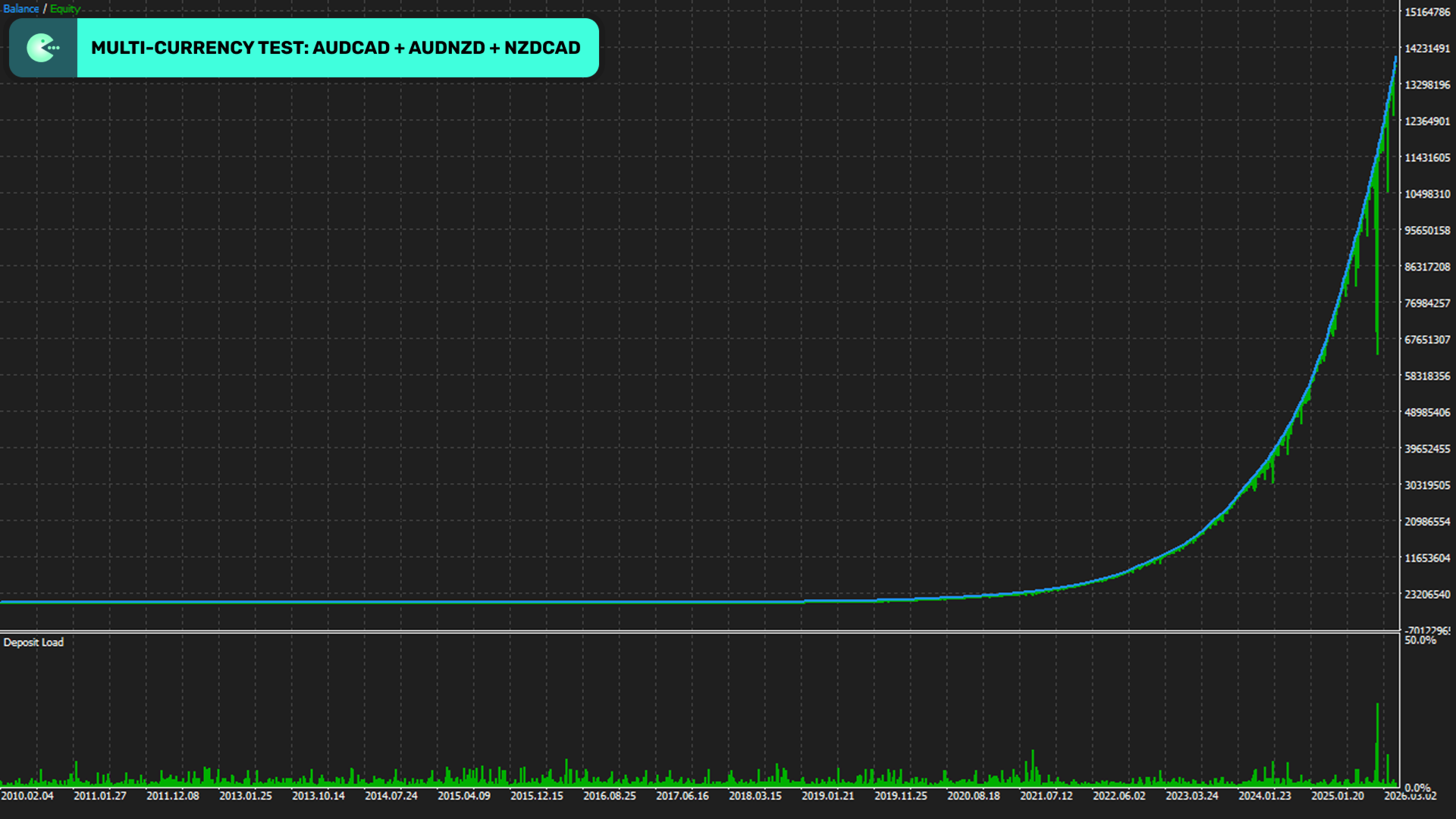
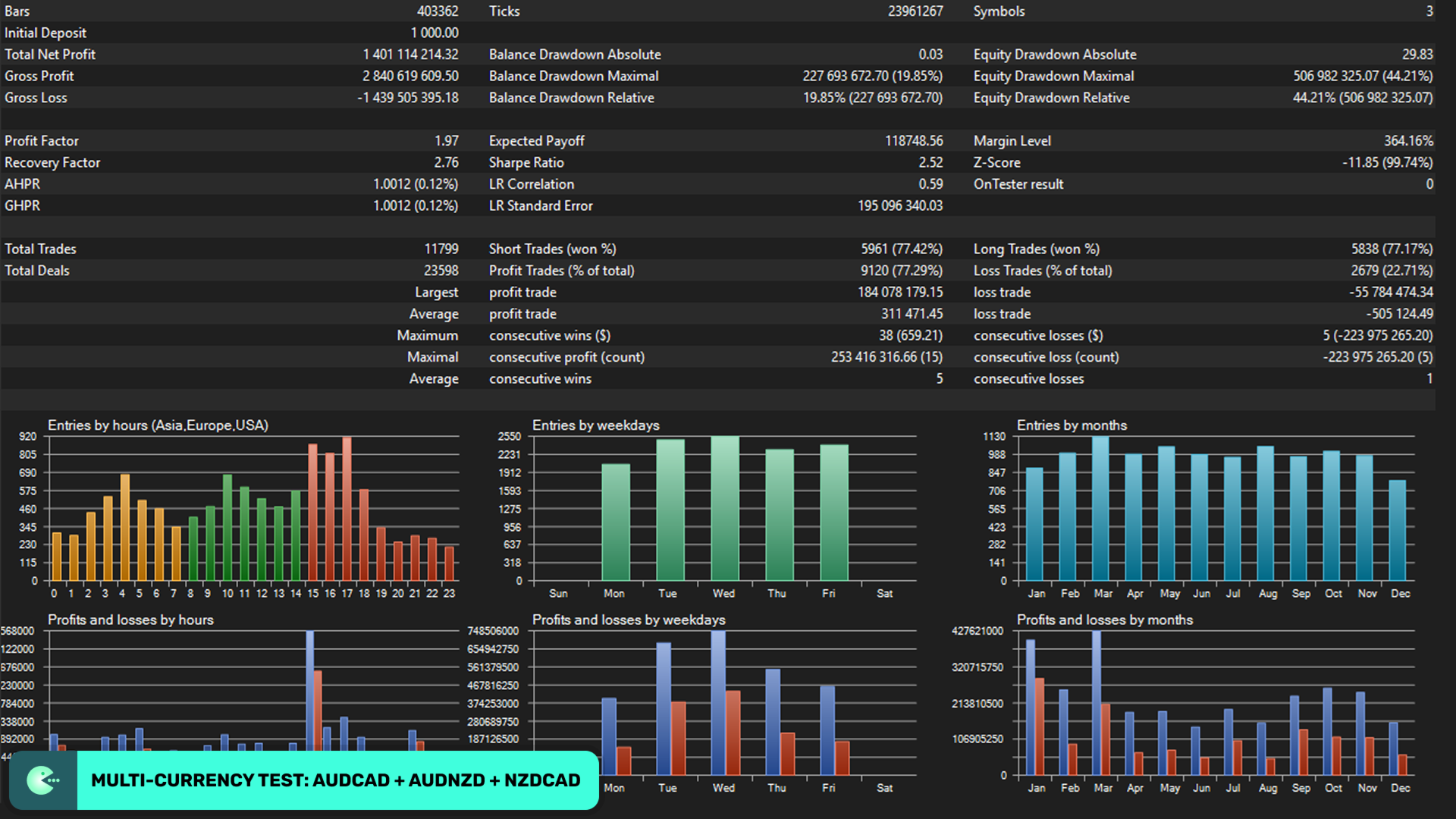
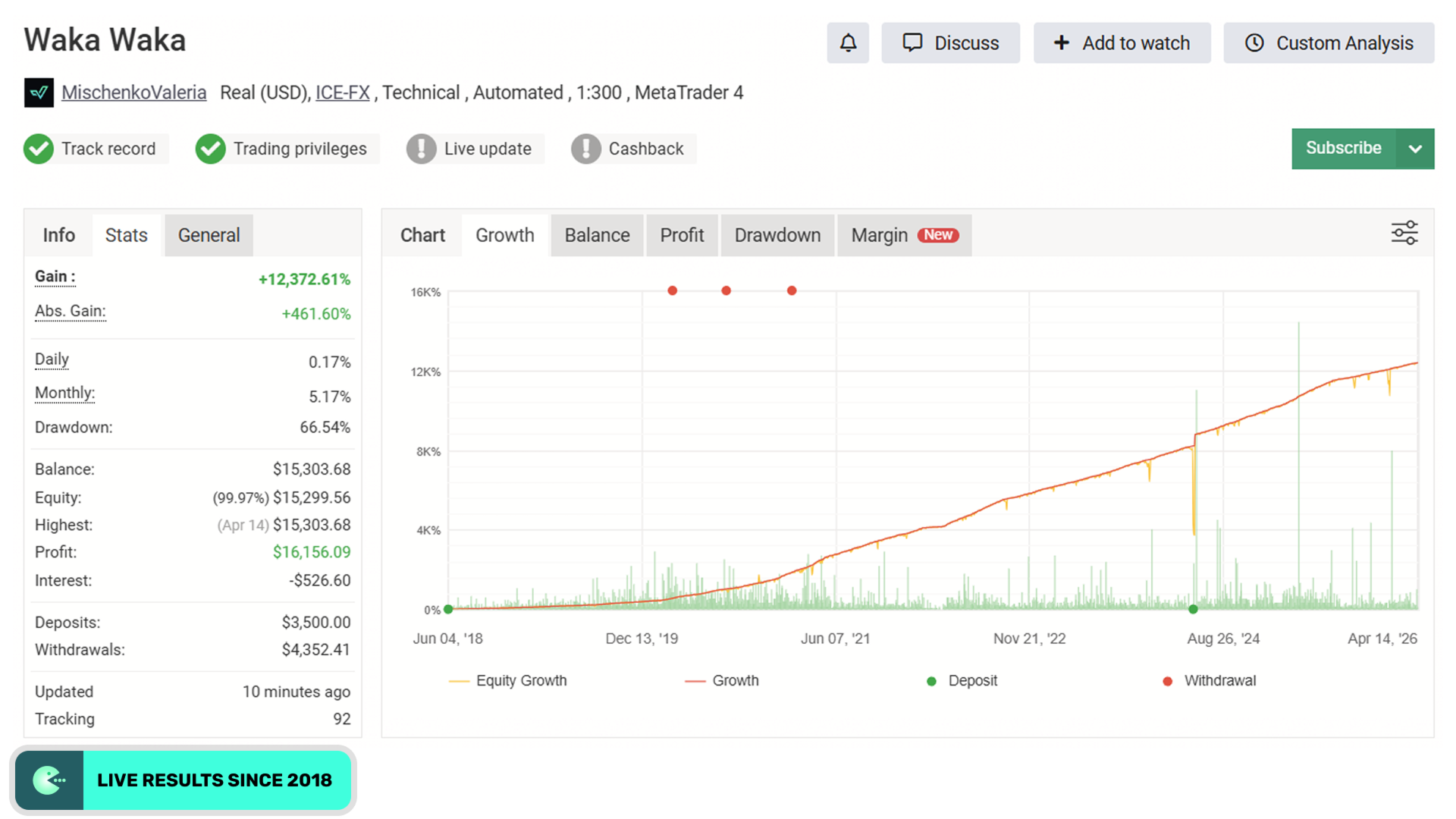
🤖 Waka Waka EA v4.59 MT4 + Set Files – Multi-Pair Grid Trading Expert Advisor
Waka Waka EA v4.59 is an automated Forex Expert Advisor for MetaTrader 4 (MT4) designed to trade a portfolio of selected currency pairs using a grid-based trading and mean-reversion approach.
The EA is configured to monitor AUDCAD, AUDNZD, and NZDCAD from a single M15 chart. Its one-chart architecture allows multiple supported currency pairs to be managed without requiring a separate chart for each pair.
Waka Waka EA v4.59 also includes a News Filter, Spread Protection, Auto GMT Detection, configurable risk management, portfolio functionality, and optimized Set Files.
The EA does not require DLL files and can be operated on a compatible MT4 VPS for automated trading.
Risk Disclaimer: Grid-based trading can expose an account to increased risk during prolonged directional market movements. No Expert Advisor can guarantee profits. Historical or live trading performance does not guarantee future results. Always test the EA on a demo account and evaluate the risk settings before using real funds.
💱 Waka Waka EA v4.59 Specifications
| Feature | Details |
|---|---|
| EA Version | v4.59 |
| Platform | MetaTrader 4 |
| Timeframe | M15 |
| Recommended Pairs | AUDCAD, AUDNZD, NZDCAD |
| Trading Style | Grid Trading + Mean Reversion |
| DLL Required | No |
| One-Chart Setup | Yes |
| News Filter | Yes |
| Spread Protection | Yes |
| Auto GMT Detection | Yes |
| Set Files | Included |
| Portfolio Mode | Supported |
| VPS Compatible | Yes |
✨ Waka Waka EA v4.59 Features
🌍 Multi-Pair Forex Trading
Waka Waka EA is designed to trade multiple currency pairs from a single MT4 chart.
The recommended portfolio includes:
- AUDCAD
- AUDNZD
- NZDCAD
This multi-pair structure allows the EA to monitor the selected instruments simultaneously.
⚡ One-Chart Setup
One of the key features of Waka Waka EA v4.59 is its one-chart configuration.
Instead of attaching separate EA instances to multiple currency-pair charts, the EA can manage its supported portfolio from a single M15 chart.
This can simplify installation and account management.
📊 Grid Trading Strategy
Waka Waka EA uses a grid-based trading approach to manage positions.
The strategy is designed to build and manage groups of positions according to predefined trading rules rather than relying exclusively on a single entry and exit.
Because grid strategies can accumulate multiple positions, traders should understand the potential exposure and drawdown characteristics before using the EA with real funds.
🔄 Mean Reversion Approach
The EA combines its grid methodology with a mean-reversion trading concept, looking for price movements that meet its predefined conditions for potential reversion.
Market conditions can vary significantly, so the behavior of a mean-reversion system may change during strong or extended trends.
📰 Built-in News Filter
The integrated News Filter is designed to help control trading around major economic events.
This can be particularly relevant for Forex pairs that experience increased volatility during high-impact news releases.
🛡️ Risk Management
Waka Waka EA provides configurable risk-management parameters, allowing users to adjust factors such as position sizing and account exposure.
Risk settings should be selected based on account size, leverage, broker conditions, and acceptable drawdown.
🕐 Auto GMT Detection
The EA includes Automatic GMT Detection, reducing the need for manually entering broker-server time settings.
This can simplify the initial configuration across supported MT4 broker environments.
📉 Spread Protection
Waka Waka EA includes spread filtering designed to prevent trading when market spread conditions exceed configured parameters.
This can help avoid certain unfavorable execution conditions.
📁 Optimized Set Files
The package includes optimized Set Files that can simplify the EA configuration process.
Preset files can contain parameters for:
- Trading settings
- Risk levels
- Pair configuration
- Grid parameters
- News filtering
- Broker conditions
Always verify the selected preset before activating automated trading.
💻 VPS Compatible
Waka Waka EA can be operated on a compatible MetaTrader 4 VPS for continuous automated execution.
A VPS can allow the EA to continue running even when the trader’s personal computer is offline.
🔄 How Waka Waka EA Works
1️⃣ Portfolio Monitoring
The EA monitors the configured currency pairs:
AUDCAD + AUDNZD + NZDCAD
from its one-chart MT4 setup.
2️⃣ Market Analysis
The EA evaluates price behavior and market conditions according to its programmed strategy.
3️⃣ Trade Entry
When predefined conditions are satisfied, the EA automatically opens positions.
4️⃣ Grid Position Management
Additional positions may be managed according to the EA’s grid-based trading logic.
5️⃣ Market Filtering
News and spread filters can be used to avoid selected unfavorable trading conditions.
6️⃣ Basket Management
The EA manages groups of open trades according to its predefined position-management and exit rules.
7️⃣ Automated Exit
Trade baskets are closed when the relevant exit conditions are satisfied.
🎯 Why Use Waka Waka EA MT4?
Waka Waka EA v4.59 is designed for traders looking for an automated multi-pair Grid Trading EA for MetaTrader 4.
Key characteristics include:
- Multi-pair Forex trading
- AUDCAD, AUDNZD and NZDCAD support
- M15 configuration
- One-chart setup
- Grid-based trading
- Mean-reversion methodology
- News Filter
- Spread Protection
- Auto GMT Detection
- Configurable risk management
- Portfolio Mode
- Optimized Set Files
- No DLL requirement
- VPS compatibility
📈 Waka Waka EA – Multi-Pair Forex Grid Trading
Unlike a conventional single-pair Expert Advisor, Waka Waka EA is configured to monitor a small portfolio of related currency pairs.
Recommended Portfolio
AUDCAD
AUDNZD
NZDCAD
Recommended Setup
Platform: MetaTrader 4
Timeframe: M15
Trading Style: Grid Trading + Mean Reversion
Setup: One Chart
DLL: Not Required
The relationship between currency pairs can change over time, and correlated instruments can still move independently or experience extended trends. Proper testing and exposure management are therefore important when using a multi-pair grid system.
🛡️ Grid Trading Risk Management
Grid-based Forex strategies require particular attention to position exposure and drawdown.
Waka Waka EA provides configurable risk-management settings, but these settings do not eliminate market risk.
Factors that can affect results include:
- Account balance
- Leverage
- Position size
- Maximum exposure
- Grid parameters
- Spread
- Slippage
- Market volatility
- Extended directional trends
- Broker execution
Users should understand how the EA behaves when a market continues moving in one direction before deploying it on a live account.
📁 Waka Waka EA Set Files
The included Waka Waka EA Set Files are designed to simplify configuration.
Using the appropriate .set preset can help users avoid manually entering every parameter.
Before loading a Set File, verify:
- MT4 version compatibility
- Broker conditions
- Account type
- Currency-pair configuration
- Risk settings
- Trading hours
- Grid parameters
Never assume an optimized preset is automatically appropriate for every broker or account.
💻 Waka Waka EA MT4 VPS Setup
Waka Waka EA is VPS compatible, making it suitable for traders who want to maintain automated MT4 operation without leaving their desktop computer running continuously.
For grid-based automated Forex systems, stable execution and reliable connectivity are particularly important.
❓ Frequently Asked Questions
What is Waka Waka EA v4.59?
Waka Waka EA v4.59 is an automated MetaTrader 4 Forex Expert Advisor using a multi-pair grid-based trading approach.
Which pairs does Waka Waka EA trade?
The recommended portfolio consists of:
AUDCAD, AUDNZD, and NZDCAD.
What timeframe does Waka Waka EA use?
The recommended timeframe is M15 (15-minute).
Does Waka Waka EA use Grid Trading?
Yes. Waka Waka EA uses a grid-based trading strategy combined with a mean-reversion approach.
Can Waka Waka EA trade multiple pairs from one chart?
Yes. The EA features a one-chart setup designed to manage its supported currency pairs from a single MT4 chart.
Does Waka Waka EA require DLL?
No. The EA does not require DLL files.
Does Waka Waka EA include a News Filter?
Yes. A built-in News Filter is included.
Does Waka Waka EA support Auto GMT?
Yes. The EA includes automatic GMT detection.
Are Set Files included?
Yes. Optimized Set Files are included with the EA package.
Can Waka Waka EA run on a VPS?
Yes. Waka Waka EA is designed to be VPS compatible.
Is Waka Waka EA suitable for live trading?
The EA can be deployed in live MT4 environments, but grid trading carries specific risks, particularly during prolonged market trends. Demo testing, appropriate position sizing, and careful evaluation of maximum exposure are recommended before live deployment.
Can Waka Waka EA guarantee profits?
No. No automated trading system can guarantee profits or eliminate losses. Actual results depend on market conditions, broker execution, settings, spreads, leverage, and other factors.
🚀 Get Waka Waka EA v4.59 MT4 + Set Files
If you’re searching for a Grid Trading EA for MT4, Waka Waka EA v4.59 provides a multi-pair automated trading system with a one-chart setup, grid-based position management, mean-reversion logic, News Filter, Auto GMT Detection, Spread Protection, configurable risk controls, and optimized Set Files.
EA: Waka Waka EA v4.59
Platform: MetaTrader 4
Pairs: AUDCAD, AUDNZD, NZDCAD
Timeframe: M15
Strategy: Grid Trading + Mean Reversion
Setup: One Chart
Set Files: Included
DLL: Not Required
VPS: Supported
Test the EA on a demo account first and carefully evaluate grid exposure and drawdown before using real funds.



Reviews
There are no reviews yet.