



Smart Gold Hunter V2.0 MT5 EA + MQ5 Source Code + SetFiles | XAUUSD Gold EA | No DLL
Smart Gold Hunter V2.0 MT5 EA is an automated Expert Advisor designed for MetaTrader 5, with a primary focus on XAUUSD / Gold trading.
What makes this package particularly useful is that it includes not only the compiled Expert Advisor but also the MQ5 source code and ready-to-use SetFiles. This gives traders, developers and advanced MT5 users additional flexibility for testing, studying and customizing the EA.
The EA is designed for modern MetaTrader 5 installations with Build 6120+ and is promoted as a No DLL solution, helping simplify installation without requiring external DLL dependencies.
The supplied SetFiles can provide predefined configurations, while the included MQ5 source code allows users with appropriate MQL5 development knowledge to inspect and modify the EA.
Important: The specific trading strategy, currency-pair configuration and timeframe can depend on the supplied SetFiles and EA configuration. Always verify the included files before live deployment.
🥇 Smart Gold Hunter V2.0 MT5 – Key Features
🥇 XAUUSD / Gold Focus
Smart Gold Hunter V2.0 is designed with Gold/XAUUSD trading as its primary focus.
🤖 Automated Trading
The EA can monitor market conditions and execute trading operations automatically according to its programmed logic and configured parameters.
🧑💻 MQ5 Source Code Included
The package includes the MQ5 source code, providing access to the EA’s source-code files.
For users with MQL5 development knowledge, source code can provide additional flexibility for:
- Studying the EA structure
- Understanding the implementation
- Customization
- Testing modifications
- Further development
- Debugging
📁 SetFiles Included
Ready-made SetFiles/presets are included to simplify the initial configuration process.
Users can load a predefined configuration instead of manually entering every available parameter.
🚫 No DLL
The EA is promoted as a No DLL solution, meaning the package does not require external DLL files according to the supplied product information.
💻 MT5 Build 6120+
Smart Gold Hunter V2.0 is designed for modern MetaTrader 5 builds, with the supplied information specifying Build 6120+.
⚙️ Configurable Parameters
The EA provides configurable trading and risk-management parameters through the standard MT5 Expert Advisor interface.
🧪 Backtesting Support
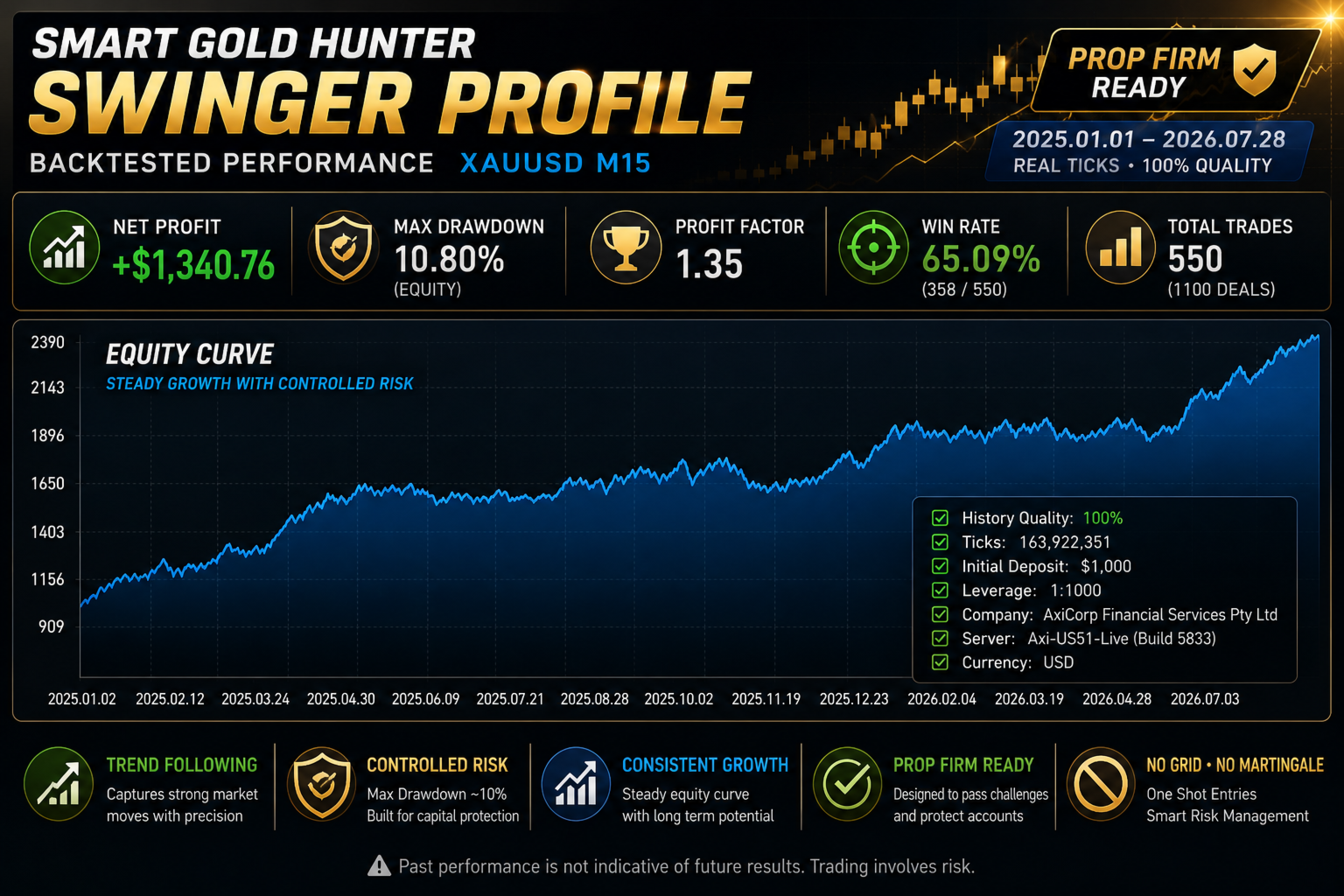
The EA and supplied configurations can be evaluated using the MetaTrader 5 Strategy Tester before considering live trading.
📋 Smart Gold Hunter V2.0 Specifications
| Specification | Details |
|---|---|
| Product | Smart Gold Hunter V2.0 |
| Platform | MetaTrader 5 |
| Primary Market | XAUUSD / Gold |
| Product Type | Expert Advisor |
| Version | V2.0 |
| Timeframe | Depends on supplied SetFiles/configuration |
| Source Code | MQ5 Included |
| Preset Files | SetFiles Included |
| DLL | No DLL |
| MT5 Build | 6120+ |
| Trading Style | Automated |
| Customization | Possible with included source code |
| Backtesting | MT5 Strategy Tester |
| Specific Strategy | Not specified in supplied information |
🧑💻 MQ5 Source Code Included
One of the main advantages of this package is the inclusion of the MQ5 source code.
Unlike a product supplied only as a compiled EA file, source-code access can be useful for users who want to work with the underlying MQL5 implementation.
What can MQ5 source code be useful for?
Depending on the license and the developer’s source-code structure, users may be able to:
- 🔍 Inspect the EA’s implementation
- 🧪 Study its logic
- ⚙️ Modify selected functionality
- 🛠️ Debug or troubleshoot code
- 📊 Develop custom versions
- 🔧 Adjust supported parameters
- 💻 Compile the EA through MetaEditor
- 🚀 Continue development
For Developers
The source-code component can make Smart Gold Hunter V2.0 relevant to MQL5 developers and advanced traders who want more than a compiled trading robot.
License note: Possession of source code does not automatically grant redistribution or resale rights. Users should follow the license terms supplied with the product.
📁 Smart Gold Hunter SetFiles
The package includes ready-made SetFiles designed to simplify configuration.
Instead of manually entering parameters, users can load the appropriate preset and then review or adjust the settings according to their testing requirements.
SetFiles can be particularly useful when comparing different configurations in the MT5 Strategy Tester.
Typical workflow:
Install EA → Load SetFile → Verify Parameters → Backtest → Demo Test → Evaluate
The exact symbol and timeframe should always be confirmed from the supplied SetFile because the available information does not specify one universal timeframe.
⚙️ Smart Gold Hunter V2.0 Settings
The exact parameters depend on the EA build and supplied configuration.
Available MT5 inputs may include trading and risk-management controls such as:
💰 Trading Volume
Configure the available lot-size or position-sizing parameters.
🛡️ Risk Management
Adjust supported risk parameters according to the selected configuration.
📈 Trading Parameters
Modify available EA inputs that control its trading behavior.
🔄 Position Management
Configure supported position-management parameters.
⏰ Trading Conditions
Where available, trading-session or operational restrictions can be configured.
📁 Preset Management
Load the supplied SetFiles to apply predefined configurations.
Because the exact parameter list is not provided, individual settings should be verified from the actual EA inputs rather than assuming specific features.
🔄 How Does Smart Gold Hunter V2.0 Work?
The general workflow is straightforward.
1️⃣ Install MetaTrader 5 EA
Install Smart Gold Hunter V2.0 into the appropriate MT5 Experts directory.
2️⃣ Select XAUUSD
Open the Gold/XAUUSD market in MetaTrader 5.
3️⃣ Attach the EA
Add Smart Gold Hunter V2.0 to the appropriate chart.
4️⃣ Load the SetFile
Apply the supplied preset configuration where appropriate.
5️⃣ Verify the Settings
Review the EA’s available parameters, trading symbol, timeframe and risk settings.
6️⃣ Test the Configuration
Use the MT5 Strategy Tester to evaluate the selected configuration.
7️⃣ Forward Test
Run the EA on a demo account to observe its behavior under current market and broker conditions.
8️⃣ Consider Live Deployment
Only after sufficient testing should live trading be considered.
💻 MetaTrader 5 Build 6120+ Compatibility
Smart Gold Hunter V2.0 is supplied for modern MetaTrader 5 environments and is specified for Build 6120+.
Using a compatible MT5 installation helps ensure that the EA and its MQ5 source code can be handled correctly.
Before installation, users should verify:
- MT5 build number
- Broker symbol naming
- XAUUSD availability
- EA permissions
- Source-code compilation requirements
- SetFile compatibility
🚫 No DLL MT5 EA
Smart Gold Hunter V2.0 is promoted as a No DLL Expert Advisor.
This can simplify installation because there is no requirement to manage separate external DLL files according to the supplied product information.
For users who prefer simpler MT5 installations, a No-DLL package can also reduce dependency on external library components.
🎯 Why Choose Smart Gold Hunter V2.0?
Smart Gold Hunter V2.0 combines several useful components into one package:
🥇 Gold Trading Focus
Designed primarily for XAUUSD / Gold.
🤖 Automated Expert Advisor
Provides an automated trading environment within MT5.
🧑💻 MQ5 Source Code
Provides source-code access for users with MQL5 development knowledge.
📁 Ready-Made SetFiles
Simplifies initial configuration and testing.
🚫 No DLL
Designed without an external DLL dependency.
💻 Modern MT5 Support
Specified for Build 6120+.
🔧 Development Flexibility
The source-code package can be useful for advanced users interested in studying or customizing the EA.
📦 What Is Included?
The Smart Gold Hunter V2.0 package includes:
- ✅ Smart Gold Hunter V2.0 MT5 EA
- ✅ MQ5 Source Code
- ✅ Ready-to-use SetFiles
- ✅ XAUUSD / Gold-focused configuration
- ✅ No-DLL setup
- ✅ MT5 Build 6120+ compatibility
- ✅ Automated trading functionality
🧪 Recommended Testing Process
Because the exact trading behavior can depend on the supplied SetFiles, test the specific configuration you intend to use.
Step 1 — Verify MT5 Build
Confirm your MetaTrader 5 installation meets the Build 6120+ requirement.
Step 2 — Install the EA
Place the EA in the correct MT5 Experts directory.
Step 3 — Compile the MQ5 Source
If working with the source code, open it in MetaEditor and verify that it compiles correctly.
Step 4 — Load the SetFile
Apply the supplied preset to the EA.
Step 5 — Verify Symbol & Timeframe
Confirm the configuration is appropriate for your intended XAUUSD setup.
Step 6 — Backtest
Use MT5 Strategy Tester to examine historical behavior.
Step 7 — Demo Test
Run the configuration on a demo account using your intended broker.
Step 8 — Review Risk
Evaluate:
- Maximum drawdown
- Losing periods
- Trade frequency
- Position size
- Exposure
- Spread sensitivity
- Slippage
- Execution behavior
Step 9 — Customize if Required
Users with appropriate MQL5 knowledge can study or modify the supplied source code, subject to the product license.
❓ Frequently Asked Questions
What is Smart Gold Hunter V2.0?
Smart Gold Hunter V2.0 is an automated MetaTrader 5 Expert Advisor focused on Gold/XAUUSD trading.
Does Smart Gold Hunter V2.0 include source code?
Yes. The package includes MQ5 source code.
What is the benefit of MQ5 source code?
MQ5 source code allows users with MQL5 development knowledge to inspect, study, test and potentially customize the EA according to the applicable license.
Does the package include SetFiles?
Yes. Ready-made SetFiles are included.
Does Smart Gold Hunter require a DLL?
No. The supplied product information identifies it as a No-DLL EA.
Which MT5 build is supported?
The supplied specification identifies MetaTrader 5 Build 6120+.
Does Smart Gold Hunter trade Gold?
Yes. XAUUSD / Gold is the main market focus specified for the product.
What timeframe does Smart Gold Hunter use?
The timeframe depends on the supplied SetFiles and trading configuration. A single fixed timeframe is not specified.
What trading strategy does Smart Gold Hunter use?
The specific strategy logic is not disclosed in the supplied product description, so it is better to evaluate the EA’s actual behavior and source code rather than assume a particular strategy.
Can I modify Smart Gold Hunter?
The included MQ5 source code provides the technical basis for modification by users with appropriate MQL5 knowledge, subject to the applicable license terms.
Can I backtest Smart Gold Hunter?
Yes. The EA can be evaluated using the MetaTrader 5 Strategy Tester.
Does Smart Gold Hunter guarantee profits?
No. No automated trading system can guarantee future profits. Results can vary due to market conditions, broker execution, spreads, slippage, configuration and risk management.
⚠️ Risk Disclaimer
Smart Gold Hunter V2.0 is automated trading software and does not guarantee profits.
Gold/XAUUSD can experience significant price volatility, rapid market movements and changing spreads. Automated trading can result in losses, and actual results may differ substantially from historical or backtested results.
The performance of the EA can depend on the selected SetFile, broker conditions, execution, spread, slippage, account size and risk settings.
Always test the EA and the exact supplied SetFile on a demo account before considering live deployment.
If modifying the MQ5 source code, thoroughly test any changes before using the modified version with real funds.
Never risk capital you cannot afford to lose.
🛒 Get Smart Gold Hunter V2.0 MT5 EA + MQ5 Source Code + SetFiles
Looking for an XAUUSD Gold EA for MT5 with MQ5 source code?
Smart Gold Hunter V2.0 combines an automated MetaTrader 5 Expert Advisor with MQ5 source code, ready-made SetFiles, No-DLL installation and Build 6120+ support.
Whether you’re evaluating an automated Gold trading system or looking for an MT5 EA source-code package for development and customization, this package provides the core files needed to begin testing.
Download Smart Gold Hunter V2.0 MT5 EA + MQ5 Source Code + SetFiles and start your MT5 testing or development workflow.


Reviews
There are no reviews yet.